
To find and enroll in training courses, use the Training Catalog on your illuxiLMS portal. Make sure you are logged in first. Then follow these steps:
Access the Catalog: Click on the Catalog or Training section from the main menu. This will display all available trainings.
Use Search and Filters: Utilize the search bar and filter options to find specific trainings. You can filter by category, training name, activity type (e.g. online course or live session), or price. For example, select a category or type a keyword in the search bar to narrow down results.
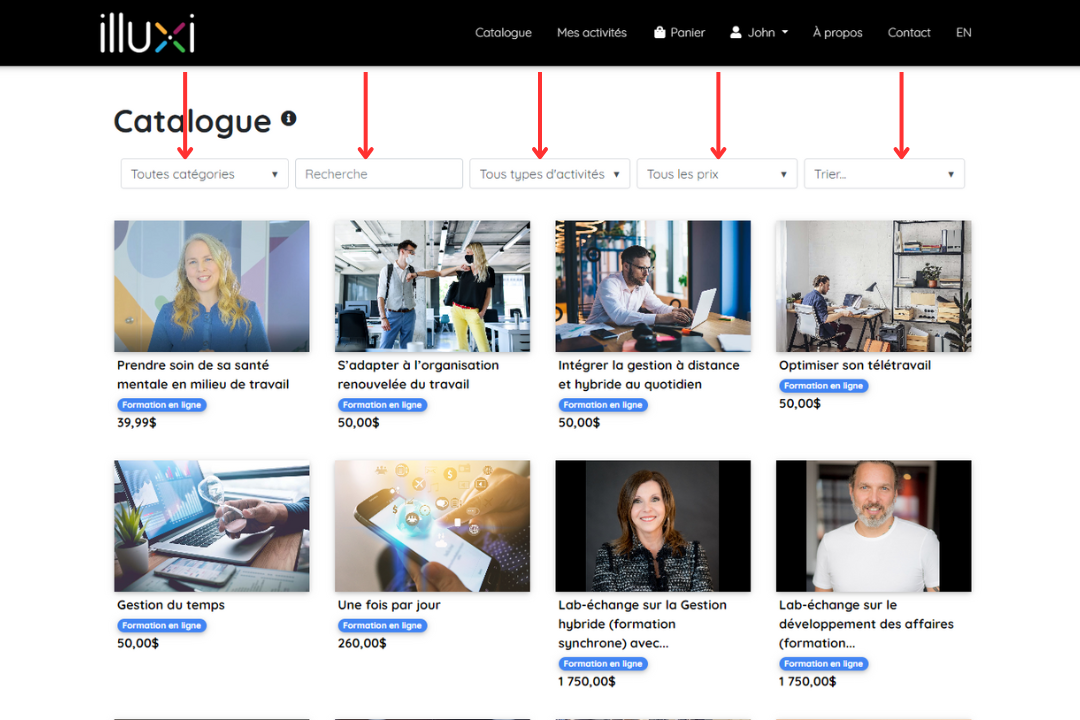
Browse Training Listings: Scroll through the list of trainings. Each training entry will show a title, description snippet, format (e.g. self-paced or webinar), and if applicable, the price.
View Training Details: Click on a training title to open its detail page. Here you will see full information such as the description, schedule (for live trainings), duration, prerequisites, and instructor details (if applicable).
Check Availability: For synchronous (live) trainings, verify the scheduled date and time. For asynchronous courses, you can usually start anytime after enrolling. Ensure the training is open for registration (not full or past deadline).
Proceed to Enrollment: If you wish to take this training, follow the enrollment instructions on the detail page (see next section on registering for a training).
Using the catalog’s search and filters will help you quickly find the right training. This catalog is the main place to discover learning opportunities offered on illuxiLMS.